The power of bit manipulation: a brief guide and essential techniques
Computers operate by manipulating electronic switches that can be either “on” or “off,” naturally working with binary numbers. This makes computers most efficient when performing binary calculations, a process known as “bit manipulation.”
While modern undergraduate algorithm classes rarely cover bit manipulation, it remains essential for developing optimal algorithms. Its influence appears in many binary data structures like heaps, BSTs, and Fenwick trees. Bit manipulation is particularly powerful in dynamic programming, where it can optimize state representation and transitions. It’s also crucial for tasks involving set operations, substring matching, and efficient memory management in systems programming.
Let us explore what we can do with bit manipulation in this article.
Signed integers and their actual structures
Signed integers are the most commonly used data types in modern programming languages. They allow us to store both positive and negative numbers in the same data structure. Let’s start by learning their actual structures in their 0-1 forms.
An 8-bit integer “6” looks like this in binary:
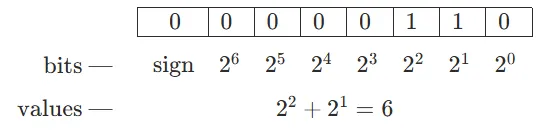
Since it’s a positive number, the “sign bit” is 0. Feels very natural, right?
A negative 8-bit integer “−6” looks like this in binary:
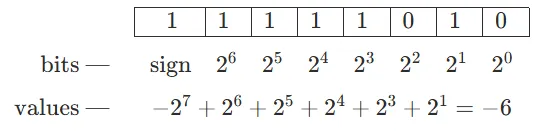
To get the values from a negative integer, you need to add up from the range minimum (for an 8-bit integer, it is ).
By the way, −1 is represented as:
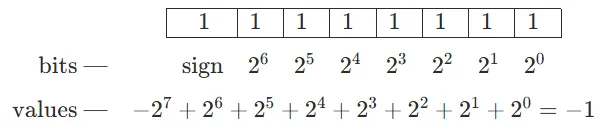
…Which is basically filling all bits with 1!
Question 1: Now that we understand how signed integers are stored, can you figure out how to calculate negative numbers from their positive counterparts? In other words, given , how do we calculate ?
The answer of this question will be given in the next chapter.
Bitwise operators
Here we’ll introduce all of the bitwise operators provided in most (if not all) of the programming languages.
Bitwise NOT. Represented as
~in most programming languages.Basically a logical NOT performed on all bits (0 to 1, 1 to 0)
Bitwise AND. Represented as
&in most programming languages.Basically, perform logical AND on all bits (1 AND 1 = 1, 0 AND 1 = 0, 0 AND 0 = 0).
Bitwise OR. Represented as
|in most programming languages.Basically, perform logical OR on all bits (1 OR 1 = 1, 0 OR 1 = 1, 0 OR 0 = 0).
Bitwise XOR. Represented as
^in most programming languages.Basically, perform a logical XOR (”exclusive or”) on all bits (1 XOR 1 = 0, 0 XOR 1 = 1, 0 XOR 0 = 0).
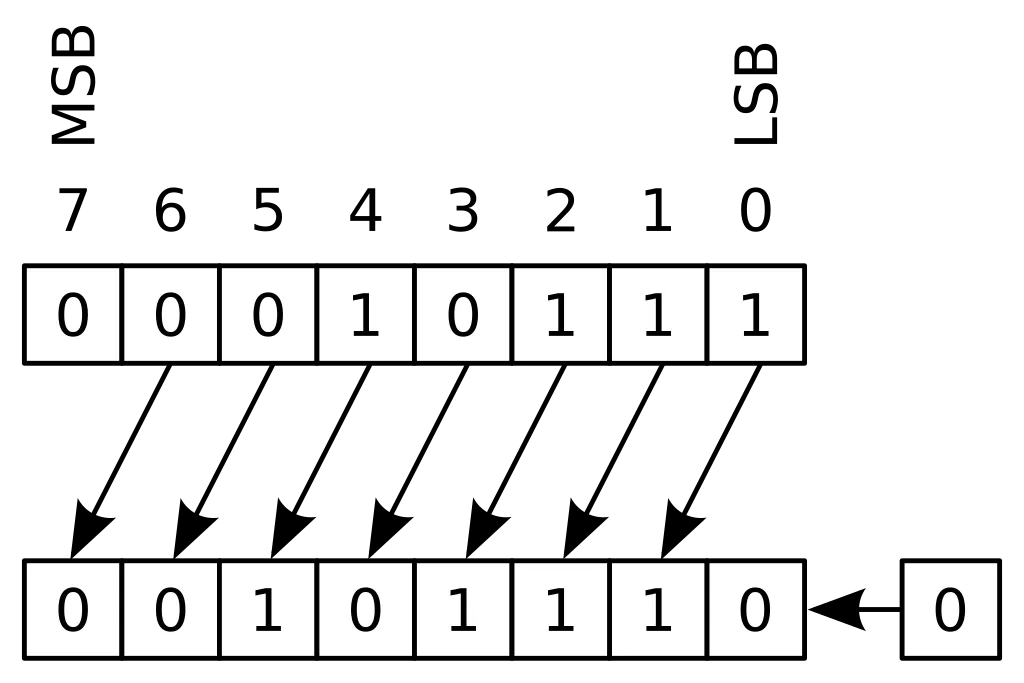
Logical shifts. Represented as
<<and>>in most programming languages. In Java, they are<<and>>>, while>>is for right arithmetic shifts.The differences of logical shifts and arithmetic shifts are — logical right shifts inserts 0 bits into the leftmost bits, while arithmetic right shifts. See the following images.
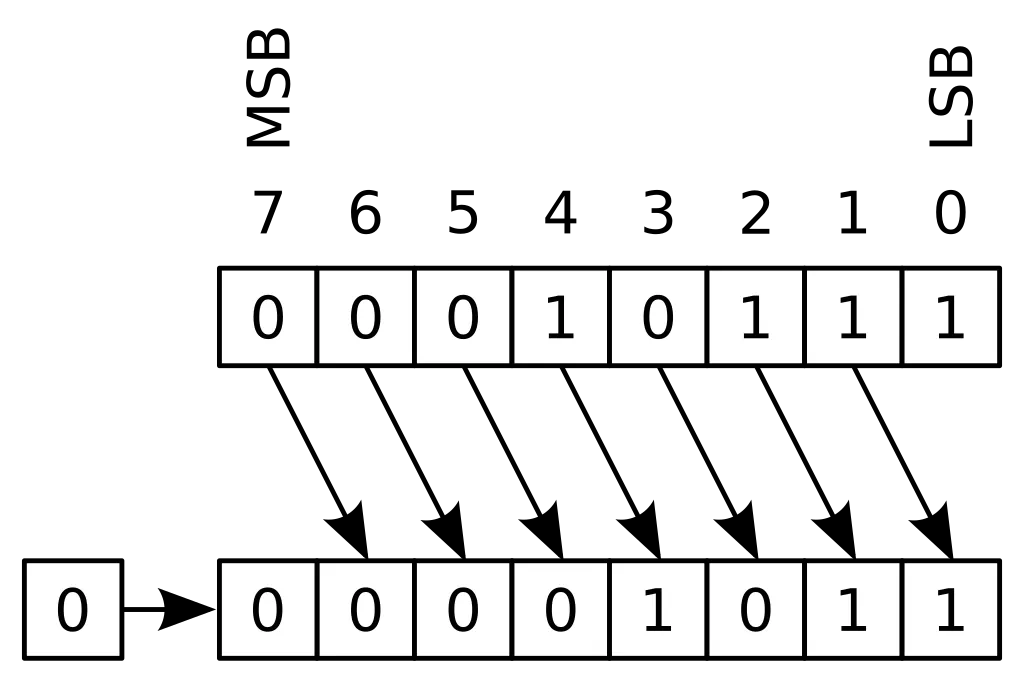
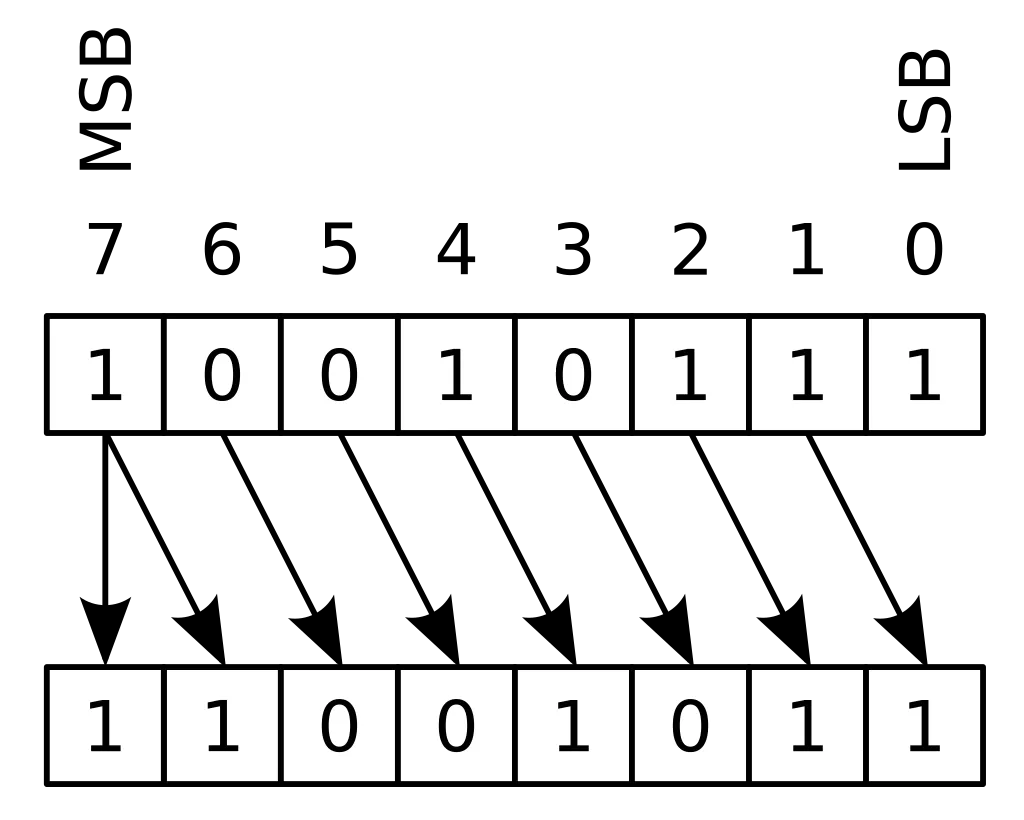
Now that we have learned the bitwise operators, it is time we review the Question 1 in the last chapter: Given , how do we calculate ?
Let’s look at the binary representations of “6” and “−6” shown in the previous chapter:

The first five digits are directly reversed, while the last three digits changed from (110) to (010).
And if we reverse all digits of 6:

Hmmm… Sounds like . Why? Let us try to prove it.
Let:

Then:
.
…While happens to be exactly equivalent to , i.e., removing and away from the full-one digits.
Generally, let be a positive integer, then , and therefore .
Now that we have tested the water of bit manipulations, let us strike right into the dungeon!
Basic bit manipulation techniques
Before reading the answers, test your math skills by trying to solve the following questions.
Question 2: How to calculate and ?
Well, obviously it’s and .
When we are traversing a segment tree, these two are especially useful.
parent = node >> 1             # faster than // 2
left_child = node << 1         # faster than * 2
right_child = (node << 1) + 1  # faster than * 2 + 1

# We could also sneak these shorthands into literally everywhere. For example:
mid = left + right >> 1        # divide and conquer
num = (num << 3) + (num << 1) + new_digit  # manual arithmetic
Note: I didn’t use parentheses in left + right >> 1, because is calculated first. Operators follow a specific order of precedence. Below is a simplified table showing the precedence relationships between bitwise and arithmetic operators in C/C++ and Python:
| Precedence Level | Operators |
|---|---|
| 1 (Highest) | Parentheses (()) |
| 2 | Exponentiation (**) |
| 3 | Unary operators (+, -, ~) |
| 4 | Multiplication, division (*, @, /, //, %) |
| 5 | Addition, subtraction (+, -) |
| 6 | Logical shifts (<<, >>) |
| 7 | Bitwise AND (&) |
| 8 | Bitwise XOR (^) |
| 9 (Lowest) | Bitwise OR (|) |
For the full table, check:
- https://en.cppreference.com/w/cpp/language/operator_precedence
- https://docs.python.org/3/reference/expressions.html#operator-precedence
For clarity and readability, I will still use parentheses as many as possible throughout this article.
Question 3: How to turn the rightmost digit into 1 or 0? How to reverse the rightmost digit? How to extract the rightmost digit?
To turn the rightmost digit into 1, we just have to apply an “OR 1” to it: .
To turn the rightmost digit into 0: .
To reverse the rightmost digit: .
To extract the rightmost digit: .
Question 4: How to turn the th digit into 1 or 0? How to reverse the th digit? How to extract the th digit?
The th digit is the digit representing . Therefore:
To turn the th digit into 1: .
To turn the th digit into 0: .
To reverse the th digit: .
To extract the th digit, we can do right shifts until the original th digit becomes the rightmost: .
Question 5: How to turn the rightmost digits into 1s or 0s? How to reverse the rightmost digits? How to extract the rightmost digits?
We all know that . Therefore:
To turn the rightmost digits into 1: .
To turn the rightmost digits into 0: .
To reverse the rightmost digits: .
To extract the rightmost digits: .
Question 6: How to turn the rightmost 0 into 1? How to turn consecutive rightmost 0s into 1s?
(1) It might be a little bit hard to understand the question on the first go. For example, this is a number:

I want to turn the rightmost 0 (the 4th digit) to 1, to get this number:

The answer to this question is: . Can you see why?
(2) Similarly, here is an example:

I want to turn consecutive rightmost 0s into 1s, to get this number:

The answer is: . Very similar to part (1).
Question 7: How to extract consecutive rightmost 1s? How to turn consecutive rightmost 1s into 0s?
(1) To extract consecutive rightmost 1s: .
This is not very direct, so here is an example:
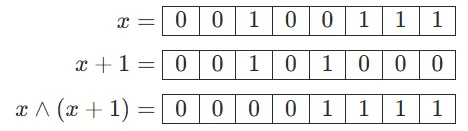
(2) To turn consecutive rightmost 1s into 0s: .
Here is an example:
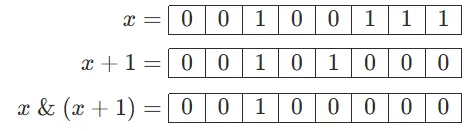
Question 8: How to extract the rightmost 1?
While this is the most challenging question so far, you're well-prepared to tackle it after mastering the previous concepts.
There are two ways to solve this question.
(1) Just try everything we learned so far. Here is an example:
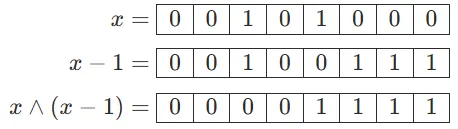
We have cleared all digits to the left. Then we just need to extract the original “rightmost 1.”
The answer is: .
(2) Hint: Refer to Question 1.
In Question 1, we learned that . Therefore, the answer is: .
Here is an example:
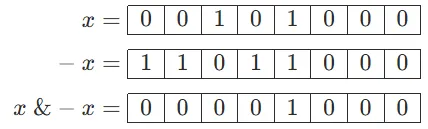
Note: This formula is the core to the Fenwick tree.
Question 9: How to count the number of 1s or 0s?
There are two ways of counting the number of 1s.
(1) We can just turn the rightmost 1 into 0, and repeatedly until no 1s remain.
Answer: .
count = 0
while x:
	count += 1
	x &= x - 1
(2) Hint: Refer to Question 8.
Extracting the rightmost 1 will also do the trick.
Answer:
count = 0
while x:
	count += 1
	x -= x & -x
For counting the number of 0s, we can just refer to Question 6, by turning the rightmost 0 to 1 repeatedly. If all digits become 1s, we can terminate the loop.
Answer: .
count = 0
while x + 1:
	count += 1
	x |= x + 1
Bit manipulation gimmicks
Here I’ll briefly introduce some bit manipulation gimmicks that may aid you in becoming a troll. 😆
Question 9: How can we swap two integers without relying on a temporary variable?
Instead of relying on a temporary variable to do the swapping, we definitely could try this:
a ^= b
b ^= a
a ^= b
Explanation: If , , then the above code is equivalent to:
Why? Because , and . (Give yourself an example if you find it difficult to get the idea.)
Question 10: How can we quickly find when given ?
Hint: For in the range , all values of are unique.
We could build a map (dictionary) to store that.
quick_log = {}
for k in range(36):
	quick_log[(1 << k) % 37] = k
Question 11: How to calculate integer powers quickly?
This technique is often named “quick power” or “quick pow.”
def quick_power(base, exponent):
	answer = 1
	while exponent:
		if exponent & 1:
			answer *= base
		base *= base
		exponent >>= 1
	return answer
Similarly, we can also implement “quick multiply” if even multiplications are taking too much time (for very, very large integers).
def quick_multiply(multiplicand, multiplier):
	answer = 0
	while multiplier:
		if multiplier & 1:
			answer += multiplicand
		multiplicand <<= 1
		multiplier >>= 1
	return answer
Bitmask in dynamic programming
Bitmask (also known as “state compression”) is a powerful technique in dynamic programming that uses bit manipulation to represent states. It is particularly useful when dealing with small sets of elements (typically ) where we need to track combinations or subsets of these elements. The key idea is to use individual bits to represent whether elements are included or excluded from a particular state.
Here, let us try two classic bitmask problems to taste the water.
Question 12: Shortest Hamiltonian path
Given a graph , a Hamiltonian path visits each vertex exactly once.
While the Hamiltonian path decision problem is known to be NP-complete, we can still attempt to solve it when is small.
First, let us figure out the state-transit equation. Given a set of previous visited vertices , we can update the minimum distance to reach vertex after visiting all vertices in set .
Then, we can start implementing this equation.
def shortest_hamiltonian_path(G: list[list[int]]):
    N = len(G)
    F = {}

    # Initialize base cases for single vertices
    for v in range(N):
        F[frozenset([v]), v] = 0

    # Try all possible sets of vertices
    for size in range(2, N + 1):
        for S in combinations(range(N), size):
            S = frozenset(S)
            for v in S:
                # Try all possible previous vertices
                F[S, v] = 0x3FFFFFFF
                prev_vertices = S - {v}
                for u in prev_vertices:
                    if (prev_vertices, u) in F:
                        F[S, v] = min(F[S, v], F[prev_vertices, u] + G[u][v])

    # Find the minimum path considering all possible end vertices
    final_set = frozenset(range(N))
    return min(F[final_set, v] for v in range(N))
However, this set thing is time consuming (and space consuming as well). Instead of using a set, why not use an integer instead?
Let us try using an integer to represent the state. One “switch” represents one vertex, and the value represents whether it is visited or not. Like this:

To get the 4th digit as a Boolean, we can do .
To modify the 5th digit to 1, we can do .
And the final state will be (suppose ):

Let us rewrite the code using bit manipulation. Get rid of sets, maps (dictionaries), and all other things that could slow us down!
def shortest_hamiltonian_path(G: list[list[int]]):
    N = len(G)
    INF = 0x3FFFFFFF
    F = [[INF] * N for _ in range(1 << N)]

    # Initialize base cases for single vertices
    for v in range(N):
        F[1 << v][v] = 0

    # Try all possible sets of vertices using bit manipulation
    for state in range(1, 1 << N):
        for v in range(N):
            if state & (1 << v):  # If vertex v is in current state
                # Try all possible previous vertices
                prev_state = state ^ (1 << v)  # Remove v from state
                for u in range(N):
                    if prev_state & (1 << u):
                        if F[prev_state][u] != INF:
                            F[state][v] = min(F[state][v], F[prev_state][u] + G[u][v])

    # Find minimum path considering all end vertices
    final_state = (1 << N) - 1  # All vertices visited
    return min(F[final_state][v] for v in range(N))
The runtime complexity is , where is the number of vertices. This is because we have possible states and for each state we try possible end vertices. The space complexity is as well, since we need to store the dynamic programming table .
Question 13: Non-attacking kings placement
Problem statement (SCOI 2005): On an chessboard, place kings such that they cannot attack each other. How many different arrangements are possible? A king can attack squares that are adjacent horizontally, vertically, and diagonally — a total of 8 squares around it.
First, let us figure out how to write the state-transit equation.
Let represent the number of valid ways to place kings in the first rows, where represents the state of the current row. A state is a binary number where 1 represents a king's position and 0 represents an empty square. For the transition, we need to ensure that kings in adjacent rows don't attack each other, which means they can't be in the same column or diagonal positions.
The state transition equation can be written as:
where represents the number of kings in state , and the sum is taken over all valid previous states that don't conflict with .
A state is valid if:
- No kings in and are in the same column;
- No kings in can attack kings in diagonally.
Here is the code:
def count_non_attacking_kings(N: int, M: int) -> int:
    F = [[[0] * (N*N) for _ in range(M)] for _ in range(N)]
    states = []  # Valid row states
    kings_count = []  # Number of kings in each state

    # Generate valid states for each row
    def generate_states(pos: int, current_state: int, kings: int) -> None:
        if pos >= N:
            states.append(current_state)
            kings_count.append(kings)
            return
        generate_states(pos + 1, current_state, kings)
        generate_states(pos + 2, current_state | (1 << pos), kings + 1)

    generate_states(0, 0, 0)

    # Initialize first row
    for state_idx in range(len(states)):
        F[0][state_idx][kings_count[state_idx]] = 1

    # Dynamic programming
    for row in range(1, N):
        for curr_state in range(len(states)):
            for prev_state in range(len(states)):
                # Check if kings attack each other
                if states[curr_state] & states[prev_state]:
                    continue
                if (states[curr_state] << 1) & states[prev_state]:
                    continue
                if states[curr_state] & (states[prev_state] << 1):
                    continue

                # Update F states
                for total_kings in range(M, kings_count[curr_state] - 1, -1):
                    F[row][curr_state][total_kings] += F[row - 1][prev_state][total_kings - kings_count[curr_state]]

    # Sum up final results
    return sum(F[N - 1][state_idx][M] for state_idx in range(len(states)))